TLDR: To bridge Bitchat and MeshCore, use this bridge code, you can flash a release binary directly.
A mesh network is a decentralized communication system where devices relay messages for each other. Unlike traditional networks that depend on central infrastructure like cell towers or internet servers, mesh networks work peer-to-peer. If one path is blocked, messages find another way through. Ideally, no single point of failure.
A crucial property of mesh networks is that they can be decentralized – meaning you don’t need a coordinator with a plan, you can ideally just put a repeater on a hill and that will support the network, without needing to configure other nodes to use it. It just appears and helps the network.
Why MeshCore Matters
MeshCore is an open-source mesh networking stack built for LoRa radios. LoRa (Long Range) is a radio technology that trades bandwidth for distance – you won’t be streaming video, but you can send text messages across kilometers using tiny, low-power devices.
What makes MeshCore special is its community. People around the world are building repeater nodes – small devices often powered by solar panels and batteries, placed on rooftops, hilltops, and towers. These nodes relay messages automatically, extending the network’s reach. In some regions, enthusiasts have built coverage spanning entire cities or even significant portions of their country. All without any cellular infrastructure, without internet, without needing permission from anyone – although LoRa uses legal bands and the project conforms to duty cycle requirements in order to avoid illegal use of the radio frequency spectrum.
The hardware is cheap and readily available. A basic node costs around $20-30. Flash the firmware, configure it, and you’re part of the mesh. You can even buy just a bit more expensive ready made portable nodes, with case, antenna and a battery, that you can put in your pocket and use from your phone. My favorite for the best deal is Wio Tracker L1 Pro. If you want a card-sized node that might fit in your wallet, check out SenseCAP Card Tracker T1000-E.
For the MeshCore bridge, however, I recommend a device with ESP32 – tested on Heltec WSL3 and Lilygo 2.1 (but that one is quite slow, so I recommend Heltec).
Note: The official MeshCore apps (Android, iOS, web) are not open-source, although there are free and open source alternatives that work. The companion firmware is fully FOSS though.
Enter Bitchat
Bitchat is a different approach to the same problem. It’s a mobile app that creates ad-hoc Bluetooth mesh networks between phones. No special hardware required – just your smartphone, which you already carry everywhere.
Open Bitchat, and your phone starts talking to other Bitchat users nearby via Bluetooth. Messages hop from phone to phone. At a protest, a festival, or in a building with no cell service, people within Bluetooth range (roughly 10-100 meters depending on conditions) can communicate.
The beauty of Bitchat is its zero barrier to entry. No hardware to buy, no configuration needed. Install the app, pick a name, start chatting.
The Bridge
Now imagine combining these two systems.
Bitchat works great for local communication – within a building, across a square, through a crowd. But Bluetooth range is limited. MeshCore can span kilometers, even tens of kilometers with good repeater placement, but requires dedicated hardware.
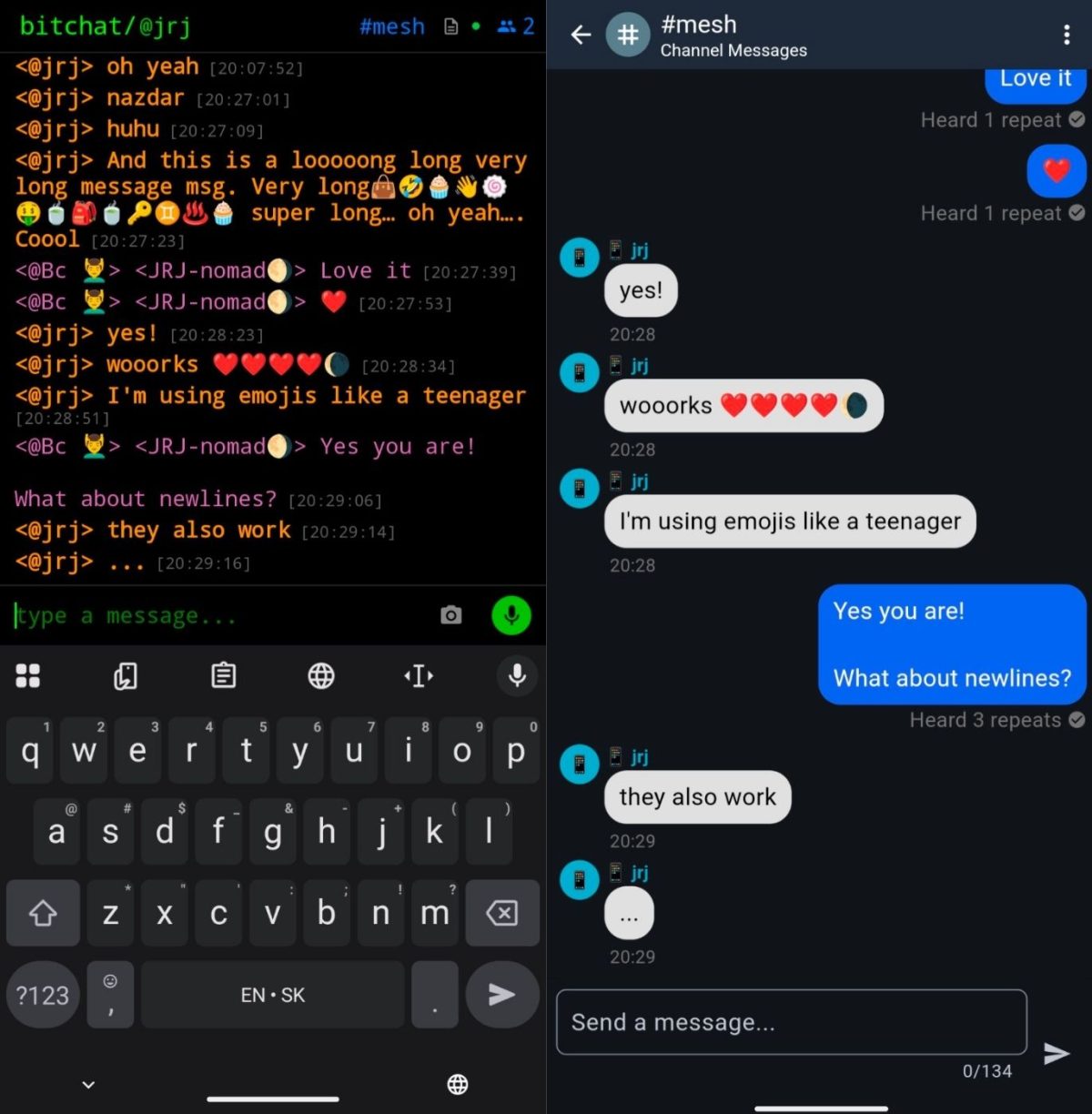
The Bitchat-MeshCore bridge connects these worlds. A MeshCore node running the bridge firmware appears as a Bitchat peer to phones nearby. Messages sent on Bitchat get relayed to the MeshCore network and vice versa. Suddenly, that local Bluetooth bubble is connected to a city-wide or country-wide LoRa mesh.
The messages are relayed and both users see the communication in their respective app. MeshCore users don’t need to know there are Bitchat users and vice versa – everyone uses the app and network they prefer.
When Infrastructure Fails
Consider scenarios where this matters:
Natural disasters. Earthquake, hurricane, flood. Cell towers are down. Internet is out. Power grid failed. People need to know: Where is help? Which roads are passable? Where are supplies being distributed? With Bitchat on their phones and a few MeshCore bridge nodes scattered around, survivors can share critical information across the affected area.
Political upheaval. We’ve seen it happen repeatedly – governments facing protests shut down the internet. They block social media, cut mobile data, sometimes kill cellular service entirely. It happened in Iran, Myanmar, Belarus, and dozens of other places.
In these moments, information is survival. Where are the police concentrating? Which streets are blocked? Where are people gathering? Where is it safe? Satellite TV might tell you what’s happening nationally, but you need local, real-time information to navigate safely.
If even a handful of people in a city have MeshCore nodes with the bridge firmware, different neighborhoods/squares can stay connected and coordinate. Someone three kilometers away can warn you about what’s coming your way. All through a combination of the phones people already have and a distributed network that no authority controls or can easily shut down.
During Iran’s ongoing revolution, this kind of resilient communication infrastructure could mean the difference between effective coordination and dangerous isolation. When you can’t trust that your messages are getting through, when you don’t know what’s happening two blocks away, movements fragment and people get hurt.
Technical Overview
Supported Hardware
The bridge firmware runs on most LoRa boards supported by MeshCore. For full list, check the bridge documentation.
These devices cost between $15-80 depending on the model and where you buy them.
I only tested on Heltec Wireless Stick Lite V3, LilyGo 2.1 and Wio Tracker L1 Pro (although that one only support uncompressed = short messages). Patches welcome.
Flashing and Configuration
- Download the appropriate firmware for your board from the releases page
- Flash it using esptool or a web flasher
- Connect to the MeshCore Web App via USB serial (works in Chrome/Edge browsers)
- Configure your radio preset – this must match what other MeshCore users in your region are using
- Set your node name and other preferences
Once configured, just power on the device. On your phone, open Bitchat and use the default #mesh channel. Messages you send there will be bridged to MeshCore, and MeshCore messages will appear in your Bitchat.
In meshcore, we relay to a hashtag channel called #mesh, you need to add it to your node, if you want to use the MeshCore app (this is possible!)
Current Limitations
This is an early release. Some constraints to be aware of:
- No direct messages – only the #mesh channel is bridged
- Single channel – all bridged traffic goes through #mesh
- No end-to-end encryption – the channel key is public, treat it as a public square
- User list is local only – you see Bitchat users in your immediate Bluetooth range, not across the whole mesh (but this makes sense since you can’t DM them anyway)
- Text only – images, files, and voice messages are not supported
- Message splitting – longer messages get split due to LoRa packet size limits, but note that not all parts might be delivered due to repeater interference
The bridge has been tested with both iOS and Android versions of Bitchat. The bridge can run autonomously, no need to connect it to a phone – it is a full Bitchat and MeshCore node.
Get Involved
MeshCore is open source. The bridge firmware is available on GitHub including source code. If you want to help build resilient communication infrastructure for your community, start by getting a compatible board, flashing the firmware, and joining the mesh.
In ordinary times, it’s a fun hobby project and an interesting technology to experiment with. In extraordinary times, it might be a lot more than that.