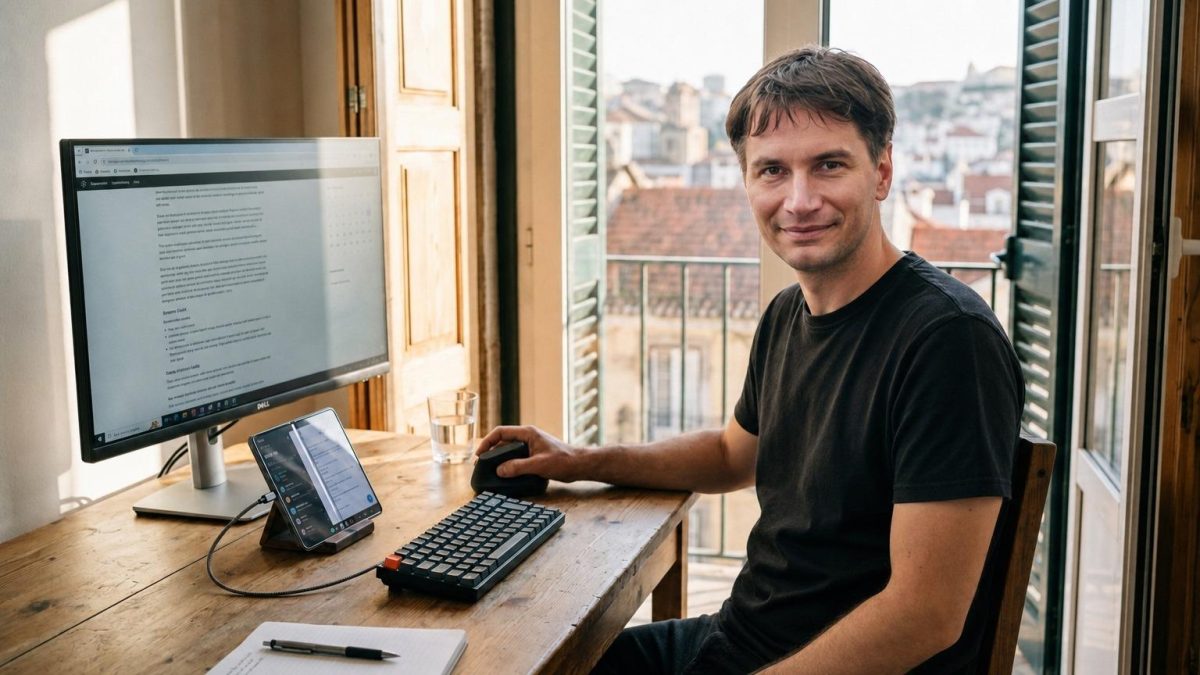
On this page I’d like to show you some of my favorite products. Some links are affiliate links (I get a commission if you buy), some links give you a discount (people often ask me about them), some do both and some I just share because I like them. The main criterion for something to be on this page is that it’s a product or service I actually enjoy using and that isn’t just some completely mainstream thing everyone already uses.
My friend Wilder runs a project called allineed.wiki, a set of curated packing lists for digital nomads, travelers and athletes, organized by travel style (minimalist, hitech, nature, urban, swimmer, runner, cyclist, diver). It’s a practical resource if you want to quickly put together your travel gear without having to sift through dozens of reviews yourself.
Books and texts
First of all, check out my book Cryptocurrencies – Hack your way to a better life. In my e-shop you’ll also find other courses and materials.
I’ve also published a novel, Tamers of Entropy – about the merge with AI, consciousness, identity, surveillance and what happens when someone takes a different path. It’s available as a paperback, a “premium” version (paperback with a USB drive containing the audiobook, extra materials and a small surprise), and separately as a downloadable ebook or audiobook. Get it at hackyourself.io or read more at tamersofentropy.net.
You’ll find a lot of my other products and articles here on my blog and in my podcast.
If you subscribe to my newsletter you’ll get updates on new blogs and podcasts I publish. If you’re genuinely interested in these topics, I recommend the newsletter – on social media you’ll very likely miss something. But if you do want social media, check out this blog post about where you can publish and connect without hassle.
Biohacking
- A tool for better meditation: Muse. Meditate effectively with neurofeedback – 15% discount on Muse, Muse2 and Muse S if you click this link. I currently use Muse S, which also measures sleep, though I track sleep via Oura. I chose Muse S because it’s the most comfortable to wear. Ships from Ireland, no customs hassle within the EU.
- I’m currently experimenting with neurofeedback and pulsing infrared light using the Sens.AI headset. So far I’m quite enjoying it.
- Vagus nerve stimulation is a form of neuromodulation in which gentle electrical impulses activate a nerve connected to the parasympathetic nervous system. It is used, among other things, for calming, supporting stress and nervous-system regulation, and potentially supporting immune and other bodily functions. I initially used Pulsetto, which stimulates the nerve through the neck; its sales model is a bit odd, for example pushing a subscription that you have to cancel if you do not want it. I coded my own desktop app and Android app for Pulsetto, and they work without an account or internet access. I now also use the newer and more comfortable Nurosym. Unlike Pulsetto, it clips onto the ear, needs no conductive gel or app, and studies suggest that it is also more effective.
- A cheap and simple change you can make is using a vertical mouse at your computer. I specifically use the Logitech MX Vertical. It took me about two days to get used to a vertical mouse, and my hand has been happy ever since. That was several years ago now.
- My favorite morning ritual is so-called fatty coffee (or bulletproof coffee). Combined with not eating any carbs (no breakfast for me, first meal in the afternoon) it kickstarts fat metabolism, which provides long-term stable energy. To jumpstart the metabolism I use C8 MCT oil, specifically this one from Powerlogy. It contains fat that converts to energy the easiest and kickstarts the use of other fat stores in the body. My coffee recipe: I make an aeropress, pour it into a blender, add a teaspoon of C8 MCT oil, some butter (I use grass-fed Kerrygold) – or alternatively you can use ghee or cacao butter. Sometimes if I feel like I need some protein, I add collagen protein too. Blend all of this in a blender (if you just stir it with a spoon, the fats won’t emulsify properly and besides, it’ll taste bad). If you don’t drink coffee, you can replace it with matcha or mate tea (though you’ll need to play with the taste a bit). If you don’t want to drink anything, you can get a similar effect with dark chocolate with MCT oil.
- I sometimes add adaptogenic mushrooms to my coffee – for example from Kaapa Health or Zajkove Huby.
- Tools for making coffee at home: a Hario grinder and an Aeropress. For travel I use the Timemore Chestnut C2 grinder.
- Oura ring – a ring for tracking sleep (and to some extent movement). I’m currently on the fourth generation. Alternatively, the Ultrahuman Ring also looks pretty good, though I have no personal experience with it since I use Oura. Other alternatives I know nothing about are RingConn. The ultra-cheap Chinese Colmi is apparently not worth it.
- Shoes – I’ve become part of the barefoot religion :). This means I wear shoes with ultra-thin soles, including trekking shoes for the forest. If I wear regular shoes with a thick sole, I feel bored because I can’t feel anything. Barefoot religion isn’t for everyone. Personally I use Vivobarefoot shoes, but there are plenty of barefoot brands out there.
- A friend recommended an ultrasonic Philips Sonicare toothbrush. I haven’t wanted anything else since. Try it, it’ll convert you too. Ultra-clean teeth like never before, in two minutes. Wish I’d known about it sooner.
- For biohacking I recommend having an infrared sauna at home. It’s cheaper than you might think. I have an older model from Sauna Space, which is no longer manufactured – if I were buying a new one, I’d either build my own or look at other current models on the market.
- Even better is having red and near-infrared light. I use red and NIR (near-infrared) light therapy panels from easyLight (international e-shop) – use discount code JURAJ. I use them daily for energy and recovery. Infrared and red light supports cellular energy production, speeds up recovery, reduces inflammation and improves both skin condition and sleep.
- An air purifier – a bit more advanced biohacking, but most people don’t realize that despite myths, the air in most places isn’t exactly clean. Opening windows often makes air quality worse because outside air isn’t great either, while closed windows keep dust trapped inside. I use the Dyson Purifier Cool.
- I currently use Sony Noise Cancelling WH-1000XM6 and Shokz OpenRun Pro 2. The Bose Noise Cancelling Headphones 700 are also perfectly decent. Here’s why…
- I use Sony for travel (it kills airplane, bus and train noise), podcasts and focusing by blocking out ambient noise as much as possible.
- The Apple AirPods Pro hearing-test hack is still excellent: use the Mimi Hearing Test app to create an audiogram, then let the iPhone adjust audio to your actual hearing profile. I no longer use Apple AirPods Pro; I currently use only Shokz and Sony.
- I use Shokz OpenRun Pro 2 for regular podcast listening because my ears stay uncovered – no moisture buildup, and I can still hear my surroundings. They use bone conduction, leaving the ear canal completely open.
Cryptocurrencies
- First of all, you need the right mindset and to know how to think about cryptocurrencies – how to survive or take advantage of wild price swings, what exchanges are good for, whether you can take out a loan against crypto, and so on. I explain all of this in my book Cryptocurrencies – Hack your way to a better life, in the chapter “Bitcoin strategies”.
- The best Lightning wallet is Phoenix. They can also receive and send on-chain Bitcoin, so I use them as normal Lightning wallets (as long as you can handle some small fees). I’ve also done a detailed comparison of Lightning wallets. Avoid custodial wallets – there’s no reason to use them anymore.
- If you want to pay with cryptocurrencies (for example using the Lightning network), use Bitrefill (with my link you get a small credit after your first purchase). It won’t give you a big discount, but it lets you actually enjoy spending your cryptocurrencies. Bitrefill also supports Litecoin, Bitcoin and other cryptocurrencies, but if you use Lightning the fees are lowest and payment is far more anonymous.
- To pay with cryptocurrencies where you only see a QR code or an address (and the merchant doesn’t expect Lightning), I use Anypay.Today. You pay over Lightning and Anypay handles the rest. To swap between cryptocurrencies use Trocador (my link) – an aggregator that shops the best rate across several exchangers, requires no KYC, and also offers prepaid cards. Anypay.Today uses Trocador, so one tool supports both.
- To pay by card straight from a crypto balance I use ether.fi. In my view it is one of the best crypto cards – you don’t have to sell crypto in order to spend it.
- For storing my savings (anything beyond what I’d carry in my physical wallet for an evening out) I use a Trezor Safe 5. From the Safe line I’d recommend at least the Trezor Safe 3, or ideally go straight for the Trezor Safe 7, which additionally has Bluetooth so you can connect it to your phone. The Trezor Safe 3 doesn’t have a touchscreen (it’s button-operated), so if you don’t use the device often, you won’t really benefit from the touchscreen on the pricier Safe 5 and Safe 7. The Trezor Safe devices have a secure element chip, making them more secure than older models. Either way, I recommend using a passphrase. More information is on my Bitcoin and cryptocurrency FAQ page, which I keep updated.
- For swaps between cryptocurrencies there are various services; I keep a detailed, regularly updated overview on my list of derivative exchanges, in the section “Exchange crypto to crypto”.
- For trading derivatives (perpetual swaps, leverage) I use Hyperliquid – the biggest on-chain perp exchange, no KYC, just a wallet. The link is affiliate (code JRJ) and gives you a 4% discount on fees.
- For secured loans I use Aave and Firefish (this link gives you a fee discount). Firefish requires KYC, Aave does not. A complete guide to loans, along with risks and a platform overview, is in my mini-course How to harness the value of Bitcoin without having to sell it.
Apps and online services
- For encrypted email and encrypted VPN I use ProtonMail and ProtonVPN (this link gets you a free month of Mail Plus). I’m on the paid tiers (payable in BTC) and very happy with them. They now also have a calendar (though it doesn’t sync with regular calendar apps) and ProtonDrive (essentially an “encrypted Dropbox”).
- SimpleLogin is a service for forwarding email from aliases (one-time or permanent). It can create aliases, quarantine emails (block a spammer with one click), and encrypt emails using the recipient’s PGP key. You can connect various (e.g. company) domains, receive email on them and manage everything from your existing email client. Interestingly, replies go back through SimpleLogin and swap the sender address to whichever alias the email originally arrived on – so you can receive everything into one personal inbox while keeping separate email addresses for different projects, companies, etc. SimpleLogin has now merged into Proton, so it’s included in my Proton plan at no extra cost.
- For communication I use the messengers Signal and Threema, and for more anonymous communication, SimpleX. A comparison of messengers here.
- If someone sends me a long voice message and I don’t have the time or desire to listen, I transcribe it (locally on the device, so no sensitive information gets sent to the cloud) using Hello Transcribe. More on asynchronous communication in this blog post.
- For a better sense of life and to record my progress and the good things I’m grateful for and that improve my life, I used to use the Five Minute Journal app. It stopped serving me though, even after three years of daily use.
- For running my business through an Estonian company I use Companio (signing up through this link gets you a discount). Before that I set up Estonian e-residency. The advantage of an Estonian company is that tax is only paid on distributed profit – so if you reinvest profit into growth, you don’t pay tax. Otherwise it’s a standard EU company – accounting, VAT and so on work similarly to what you’re probably used to. An Estonian company is great for digital nomads who don’t run their business from a single country but travel while having clients in the EU.
- My business account for my Estonian company is with Wise (this link probably gets you a discount too). The advantage is that they directly support Estonian companies and can issue a share capital certificate in Estonian, digitally signed, which you need for share capital registration and similar formalities. So it’s very well set up for this use case.
- For bank accounts I use Liberation.travel — non-CRS bank accounts. Through Liberation I also handle residency permits (Paraguay, Uruguay, Panama).
- Unsplash for free images for articles.
- Canva for editing images.
- If, like me, you never want to drink bad coffee again, install the European Coffee Trip app (iOS, Android). At least in Europe it’ll help you find specialty coffee shops – with photos, location and everything else you need.
- For audiobooks I use Libro.fm – an audiobook subscription that, unlike Audible, has no DRM, so I get a plain file instead of a book locked inside their app.
Artificial intelligence
As my agent I use Hermes-Agent. For inference I use various subscriptions, including free Ollama Cloud, sometimes OpenCode Go, and Venice using DIEM tokens. One DIEM token gives you one dollar of inference per day. I like Venice as a model service – it is somewhat like a capital investment, as if I had bought a graphics card – but I currently consider the tokens expensive.
For local inference I currently use a Mac Mini with Ollama and MLX support. For local speech-to-text I use open-source Whisper and Parakeet, and for text-to-speech Kitten-TTS – everything runs locally. I also have a project for end-to-end encrypted inference using a trusted execution environment: venice-e2ee-proxy.
There is no point listing particular models, because I would have to update this article every week. On mobile I use ChatterUI (Android) and PrivateLLM (iOS).
Nostr
Nostr is the coolest social network out there. On mobile I use Yakihonne, Primal and Amethyst. I use Amber as my remote signer. I have my own client, nostr-emanator (GitHub), for managing Nostr accounts and automating posts. These are my projects – I am their author: nalgorithm, Lievik, roadstr and nostrautica (GitHub). I’d be happy to connect with you on Nostr here: npub1m2mvvpjugwdehtaskrcl7ksvdqnnhnjur9v6g9v266nss504q7mqvlr8p9. I also write and talk about Nostr and related projects in my article about Lievik, my article about cypherpunk communities and a podcast about AI and creativity.
Life hacking
My phone is a Pixel 10 Pro Fold running GrapheneOS. It can also be used as a desktop: with an external monitor, keyboard and mouse it can replace a laptop for many tasks. Wilder describes this “laptop-free” era in this article. For app stores I use Obtainium and increasingly Zapstore, which is useful even for non-Nostr users.
I’m a fan of 3D printing and have an older Prusa i3 MK3S.
- Finding lost items
- For Apple users (but also read the next point): Apple AirTag lets you find lost items you’ve attached it to – keys, wallet, car, backpack. For travel it’s absolutely great. You land, open the Find My app, and if you see your luggage still checking in from the airport you flew from, you know it didn’t travel with you – and you can head straight to lost & found. AirTag has a ton of interesting uses.
- A better alternative, though, is the Pebblebee Clip. It also works with Android (though setup requires a device that passes attestation, so no GrapheneOS). When setting up a Pebblebee you switch it into either AirTag mode or Google tag mode – it doesn’t work with both networks at once, you have to pick one. The Google network has wider coverage. An advantage over AirTag is USB-C charging – no battery to replace.
Travel
- Kayak Trips – forward your booking confirmations to trips@kayak.com from your email address and see your entire trip in one app: flights, trains, buses, hotels… For flights it also alerts you to gate changes or delays.
- PokeFi – mobile internet “everywhere” in the world at great prices. You need a special device that, from what I can tell, rotates eSIMs in a somewhat odd way. It takes a moment to figure out where it is and gives you weird IPs sometimes, but it works. The best-value plan is around 5GB of data for $15, valid for two years from activation.
- Mobile SIMs – I highly recommend a setup where you don’t tie your phone number to your SIM card. In that case I always use the cheapest SIM available. You gain privacy, flexibility, and the ability to use any data plan (including wifi) for calls too. On top of that, you’re not trackable everywhere in the world by a “tracker in your pocket” (your phone number). Good prepaid SIMs without KYC are sold by KeepGo, MobiMatter and Bitrefill (all payable in Bitcoin too), but also check the local market wherever you are. Use the widest possible market to your advantage – in Slovakia, for example, a French or Czech carrier might have the best data deal, and if you can buy that (e)SIM remotely, use it. Taking advantage of competition and the market works best once you free yourself from being tied to a phone number.
- A universal charger. I now use the ARSMEL VisaGo 100W. It’s a travel adapter built on GaN (Gallium Nitride) technology, which allows high wattage (100W) output without overheating like older silicon-based chargers. It has built-in outlets for different plug standards (works in 200+ countries and regions), so you don’t need a separate adapter on top of it. It can charge up to 7 devices at once – 2 AC outlets + 3 USB-C ports + 2 USB-A ports, with PD 3.0 support – and it charges my laptop and phone simultaneously. It also has a built-in voltage display that shows the outlet’s voltage (a reminder only, not a converter). Dual 10A safety fuses add an extra layer of protection.
- I like Uniqlo clothing for travel. My first purchase was an ultra-light down jacket that packs down into a tiny roll – ideal for travel. Since then I’ve bought other jackets for different climates, t-shirts, underwear. Everything is hacked for fast drying, not sweating through, and needing less laundering. This kind of clothing is also praised by Vitalik (worth reading). Physical stores exist in Western Europe and the US.
- Merino clothing is magic – underwear and t-shirts that let you feel comfortable in both summer and winter, without getting sweaty.
- Backpack – Wandrd Prvke. Great for everything.
- For booking flights and accommodation I use various things, but I’ll highlight Travala, where you can book accommodation and flights with Bitcoin.
Creating content
- I make podcasts. You’ll find the favorite tools I use for that in a separate article (in Slovak).
Post-apocalyptic and geeky stuff
I use Nostr-VPN to connect my nodes. Despite the name, it belongs here under post-apocalyptic and geeky stuff: it lets me securely connect from my phone into my home network and access my nodes through Nostr.
MeshCore
- Join the MeshCore mesh network. I order from Seeedstudio – shipping can come from Germany too (you can pick at checkout). Choose the right device:
- My first choice is the Wio Tracker L1 Pro. The battery lasts several days, it charges via USB-C, you can just drop it in your pocket and stay connected. Very good price/performance ratio.
- If you want a stationary node at home without a battery, on USB-C (also recommended – a stationary node that receives messages while you’re away): Wio Tracker L1
- The Sensecap T-1000E might fit in your wallet – it’s about the size of a (thick) credit card. Its antenna isn’t as good and it charges via a custom cable (included), but it can be pretty cool. You can also clip it onto a backpack.
- SenseCap Solar – if you want to run a repeater, the right setup is solar + battery, so our post-apocalyptic network keeps running even during a power outage. This is a ready-to-go kit, including a pole mount. Ideally place it high up with the best possible direct line of sight outward.