
Speed: · Download MP3 (14 MB)
Technical teardown (PDF): Play services, Android Auto.
Almost everyone who switches to GrapheneOS runs into the same decision: do you install Google Play services or not? The answer “no, it’s Google” sounds sensible, but it usually lasts until a banking app fails to send the notification you need to confirm a payment. The answer “yes, nothing works without them” is convenient, but let’s not pretend Play services do nothing bad in the background.
So I took the current version of Play services apart and tried to find out what exactly it does. The result is a technical teardown, which you can also download at the end of the article. This article is the lighter version: what each option costs you and what it brings you. It is an analysis of the code, not captured network traffic. I know what the app can do and what the defaults are, but what Google does with data once it reaches its servers is not visible from the app.
First: what am I actually protecting?
The book The Praxeology of Privacy by Max Hillebrand defines it like this: privacy is “the power to selectively reveal oneself to the world”. The load-bearing word is selectively. Privacy is the ability to decide what information moves outward and what stays put. It is not the hiding of guilt but control over disclosure.
Privacy is also hard to talk about because it gets mixed up with secrecy and anonymity. The book separates them nicely: “Privacy is ordinary and constant. Secrecy is a narrower case that some activities require. Anonymity is a tool that becomes necessary when attribution itself creates danger.”
For Play services that leads to a practical question: which of the things that can be found out about me do I want under my control? The candidates are location, communication (what you send and to whom), the list of installed apps, and the identity of the device itself. They do not all carry the same weight. For me location matters most, and the app list bothers me less. You may weigh them completely differently, which is why I am not trying to find a universal answer.
By the way, I recommend the book. It joins Austrian economics with cypherpunk practice, it is free (public domain), and there is an audiobook too. You can find both here.
What Play services actually are
One thing gets lost in these discussions. Play services is not “a Google account on your phone”. It is a bundle of services that a lot of apps rely on, including apps that have nothing to do with Google:
- Push notifications. Signal, WhatsApp, banks, couriers, almost anything that can beep at you goes through Google. Without Play services, notifications arrive late or not at all.
- Device checks. More and more apps, not just banking and payment ones, ask Play services (Play Integrity) whether the phone is “in good shape”. When there is nobody to ask, they either refuse to work or, more often, the server will not let the app into its backend without an attestation. I wrote about why this is happening in an article on hardware attestation.
- Location. A fast, accurate position fix from nearby Wi-Fi networks and cell towers, and location sharing in Google Maps. Plain location in Maps may not need Play services, because the system provides GPS. GrapheneOS users report that Maps works without Play services, though some see a grey map, so test it. Sharing your location with other people, on the other hand, is a Play services feature.
- Maps in other apps. Apps with an embedded Google map depend on Play services.
- Sign-in, accounts, passkeys and sync.
- Car and surroundings. Android Auto, Fast Pair for headphones, Quick Share, finding lost devices.
These are the benefits if you keep Play services. It is not just convenience. For some people it is the difference between a phone they use every day and a phone that simply cannot do some things.
What it costs
Play services are designed as a privileged part of the system. On a regular Android they have rights no other app has. GrapheneOS therefore does not run them as part of the system but as an ordinary app in a sandbox, without privileged rights. Of the 402 permissions the app declares, the system never grants 132. For example reading the IMEI without your consent, MAC addresses, or system logs.
That is the good news. The worse news is that what remains is still enough to do quite a lot:
- Regular check-in. Roughly every 12 hours the device reports to Google. On the first check-in it receives an identifier that survives everything except clearing the app’s data or a factory reset.
- Telemetry. The code contains 468 sources of usage logging. While you are signed in, they can be tied to your account.
- SIM. If you give Play services the Phone permission, they can read your SIM card identifiers.
- App list. They can see the list of installed apps without asking. This is not only a Play services thing: many apps, banking apps especially, send the list of all installed apps to their own servers. The Slovak banks I have looked at all do it.
- Play Protect. If “Improve harmful app detection” is on, it sends apps it does not recognize to Google.
- Advertising ID. It is stored locally, but available to apps until you delete it.
Code that arrives later
The teardown starts from the APK you can download from the GrapheneOS app repository, but that is only part of the story. Play services is a host for modules: the APK declares 200 of them, and after installation Google sends more module APKs to the phone through the Play Store. On my Pixel the system was compiling thirteen such modules, and none of them is in the repository. Which ones a phone gets is decided by a configuration file from Google’s server, not by the APK.
You cannot get these files off a phone without root. So I set up a test emulator with root and pulled the modules out there: 24 APK files in 19 builds, plus the DroidGuard engine (the part of Play Integrity that checks whether the phone is “in good shape”). They do not come from GrapheneOS, but they are the same modules Google sends to Play services everywhere. Each file matched the checksum Play recorded for it. Then I decompiled them.
The good news is that they are mostly what their names say: QR and barcode scanning, text recognition, the map renderer that apps with an embedded Google map use, the ad renderer, passkeys, launcher search and an on-device search index. They are ordinary code.
What bothers me is something else. None of these modules asks for a single permission. They use the permissions of the process they run in. Most run inside Play services and get everything you gave Play services.
The map and ad modules are loaded into the app that shows the map or the ad, and they get that app’s permissions and network access. So if you deny Play services network access, this code still reaches the network. The ad module has one detail I did not expect: if it cannot get the advertising ID, it sends the app’s Android ID in the ad request instead, unhashed.
An example from the other side: you allow Play services the camera so it can scan QR codes. That camera is then used by a module you did not install yourself. Play services downloaded it based on their own configuration, and you will not find it in the app list or in the settings.
Google can also replace that code without updating Play services. On GrapheneOS that at least means only what you allowed. On regular Android, where Play services is a system app, it is a lot more.
The DroidGuard engine is the most interesting piece. It is deliberately hard to read: the functions it advertises are decoys and the real ones are registered under encrypted names. On its own it fingerprints the graphics chip and its drivers and summarises motion-sensor readings, and Play services hands it the Android ID and the Play Protect list of harmful apps on the phone. Everything else depends on a small program Google sends with each check, and the engine contains a generic gateway that lets that program read any file or make any system call Play services itself can. I could not capture such a program, so what a real check looks at I do not know.
This is what dynamic code loading means: the code that runs is not fixed by the APK you installed. And it can be different for different people. Which modules a phone should have arrives as a remote setting, and the request for it carries the device’s Android ID and a token for every signed-in Google account. So Google can technically send one specific device or account a module that nobody else gets, without any Play services update that someone could inspect. What it cannot do is let anyone else do the same: before a module loads, Play services checks that Google signed it. Whether Google ever targets someone like this cannot be seen in the code. In plain words, if Google wanted to put targeted spyware on one phone, the delivery mechanism is there. On GrapheneOS that code would still have only the permissions you gave Play services, which is the main reason it matters what you give them.
I am not the first to notice that this code is not fixed. Romain Thomas took apart DroidGuard in the older SafetyNet service (SSTIC 2022) and found that Play services download the latest DroidGuard if it is missing, and that it then fetches a bytecode program that is “unique for each attestation request”. Doug Leith at Trinity College Dublin (2025) found that Play services download per-app settings with experiment tokens, so Google can try a change on a small group of users first, and that the module delivery request (play-fe.googleapis.com/fdfe/moduleDelivery) sends the Android ID. GrapheneOS had to teach its runtime to load Play services’ Dynamite modules from file descriptors (pull request). As far as I know, nobody has published a look at the delivered modules themselves, with a per-module list of where they connect and what they could target. That part is new.
In practice that means there is no single “Play services” that all of us run and that could be audited once for everybody. Your phone sends Google its configuration, and on that basis Google decides which modules it gets and in which versions. The app then downloads them and updates itself, without anyone shipping a new Play services release. Two phones with the same Play services version can run different code. What I describe here is the host app (the Play services installation package itself, the APK) plus a sample of the dynamic code that one test device downloaded. It is not an assessment of what will run on your phone.
Let’s look at the ads module too. When an app shows a Google ad, the ad server hands the module addresses to call, for example to count an impression or a click. The module calls every one of them, follows redirects and does not check where they lead. One ad can make your phone talk to a whole chain of advertisers and measurement companies.
GrapheneOS has a switch for this: Settings > Apps > Play services > Exploit protection > Dynamic code loading from storage. For Play services loading is allowed by default: GrapheneOS made an exception because the older Dynamite modules are not yet replaced by split APKs. When you turn it off, the DroidGuard engine and the downloaded modules stop loading (in issue #8714 Play services crash exactly while loading a module from `app_chimera`). The price is high: Play Integrity, QR scanning, text recognition and passkeys will probably stop working. I have not tried it on my main phone, so treat it as an experiment, not a recommendation. And there is a catch that goes beyond the features: see the next part on attestation.
What passes attestation on GrapheneOS
Strong integrity, meaning hardware attestation signed by Google, is something GrapheneOS cannot prove, so apps that require it stay blocked. You cannot get around that with a setting or by restricting Google’s code. GrapheneOS explains in its attestation compatibility guide how app developers could accept its keys instead, and the community tracks which banking apps are affected in the PrivSec compatibility list, which GrapheneOS does not vouch for.
Far from everything falls on attestation, though. As far as I know, with Play services in the GrapheneOS sandbox, basic and device integrity usually pass (the GrapheneOS usage guide says it passes basicIntegrity but is not Google-certified). Many apps check only these levels, and those are exactly what you could lose by switching things off: DroidGuard generates the inputs for these verdicts, so without it even what passes today cannot be evaluated. An app that works now could start reporting an integrity error.
Cost-benefit analysis
I do not want to judge what is good or bad, because I do not know your priorities. But I can say what each decision brings and what it costs you. Doing nothing has its costs, or at least its consequences, too.
| Costs | Benefits | |
|---|---|---|
| I install Play services | Google gets a device identity, telemetry and the list of apps. You have to set the permissions and check them now and then. | Push, maps, Android Auto and some of the apps that require attestation all work. The strictest ones will not pass even with Play services, because GrapheneOS is not certified by Google. |
| I don’t install them | Some apps will not work and push may arrive late. You have to look for alternatives. | No device identity at Google and the smallest surface through which anything can leak. |
Neither decision is good or bad in general. It depends on what you protect and what you actually care about in life. If you never use Android Auto and your bank lives in the browser, you may not need Play services. If you would miss the work notification in the morning, you do. There is also a third option between “install” and “don’t install”: install them and take away the permissions they do not need. That is what the next part is about.
What to do if you want them
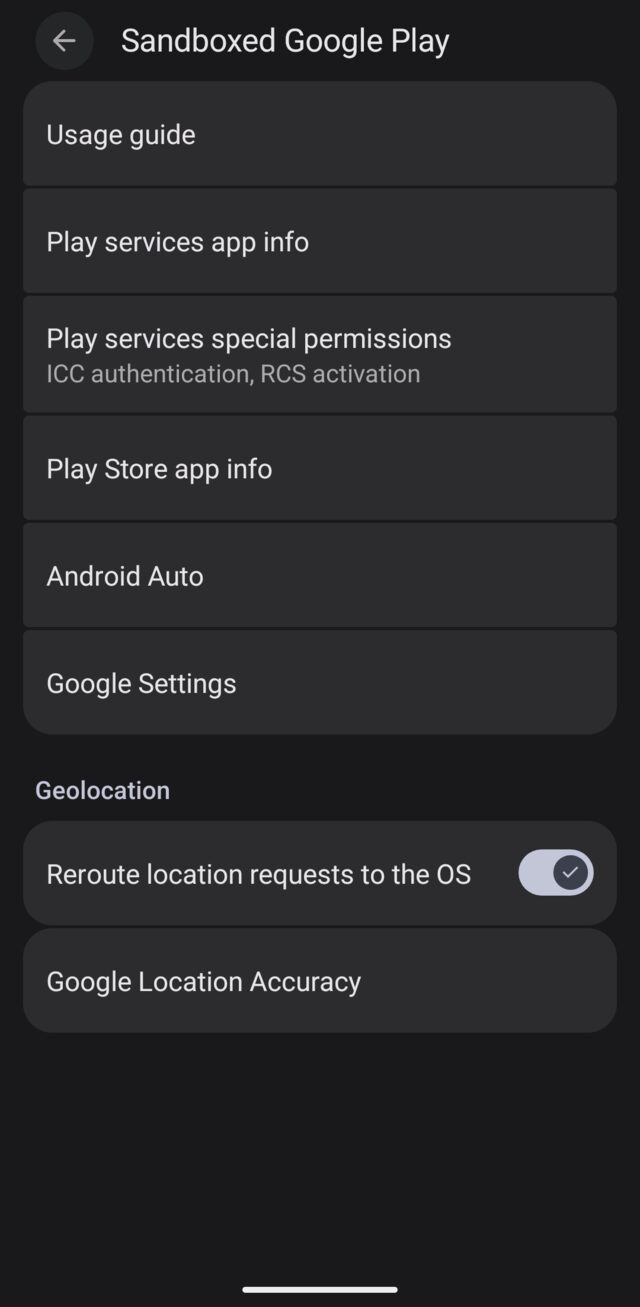
Everything I describe is an ordinary menu setting. Nothing gets patched or reinstalled. Most of it lives in one place: Settings > Apps > Sandboxed Google Play.
1. Decide where to put them
You can install Play services in your main profile, or in a second user, a work profile or Private Space. Then only the apps in that profile can use them, and Play services see only that profile’s apps and data. A separate profile makes sense if few apps need Play and you want the rest outside Google. It has a price, though: Play services still contact Google while the profile is running, and you get push only while that profile is in front of you (Private Space stops when you lock it). If push is one of the reasons you want Play services, they belong in the profile you mainly use, so install them there. That is how I do it too: I have Play services in my main profile, for push notifications and usability. When I order food through Wolt or Uber, I want to know when it is arriving. My private profile has no Play services. Private Space is under Settings > Security & privacy > Privacy > Private space.
2. Take away what they do not need
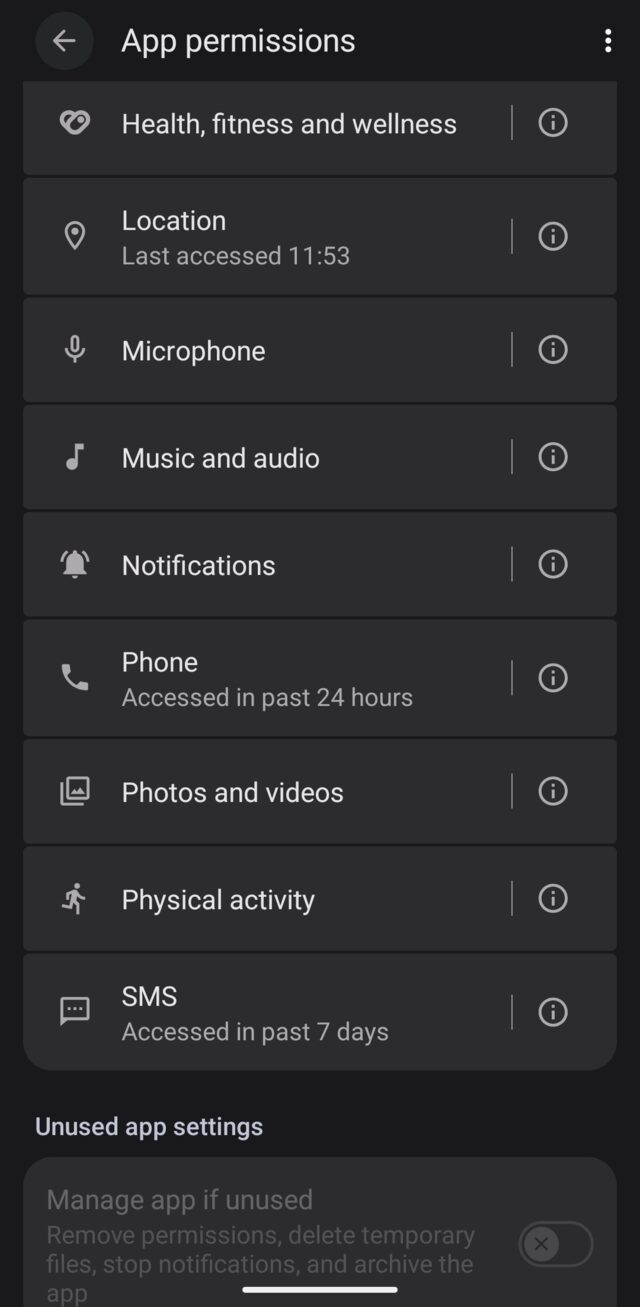
Open Play services app info > Permissions. These are the most sensitive ones:
- Phone. IMSI and SIM details for check-in. Leave it on Don’t allow.
- SMS. Leave it on Don’t allow unless you use something that reads verification SMS through Play services.
- Contacts. If an app wants contacts, give it Contact Scopes, not full access.
- Location. The next section covers it.
3. Switch off what can be switched off
- Advertising ID. Google Settings > All services > Privacy & security > Ads > Delete advertising ID. Apps then get all zeros.
- Usage & diagnostics. In the same section, switch it off.
- Play Protect. Play Store > profile icon > Play Protect > Settings. Leave “Scan apps with Play Protect” on and switch off “Improve harmful app detection”.
4. The network switch (I would not use it)
On GrapheneOS every app has its own Network permission. If you take it away from Play services, they are left completely offline. I would not recommend it, even though it is the strongest tool you have. Play services without internet are not much use (a QR code that an already downloaded module reads still works), and most people want them for push notifications, which travel over exactly the connection you cut. Banking apps, messengers and couriers stop notifying you, sign-in and Play Integrity fail, and it breaks a lot more besides. If you want to go this far, it is better not to install Play services at all. Limit the permissions first, as above.
A rant about location
Now to the thing that bothers me most in all of this. Location.
Up front: installed apps do not bother me that much. Google sees that I have Uber? Fine, I have Uber. I can live with that, and when I want to hide something there is Private Space. Location is different. I do not like sharing where I am, and certainly not ahead of time.
A practical example. Post the beach photo only when you are sitting on the plane. “I was in Switzerland recently” is fine, “I am in Switzerland” is information not everybody needs to see.
In a recent podcast I mentioned the Paraguayan prosecutor Marcelo Pecci. In May 2022 he was shot dead on a beach on the island of Barú near Cartagena, Colombia, where he was on his honeymoon. His wife had been posting beach photos on Instagram. According to OCCRP reporting, four of the accused who pleaded guilty said they followed his movements through social media. Police tied the murder to his work, but the attackers learned where to find him from social media. Live location makes the job easier for anyone who is looking for you.
It is possible to overdo it, though. You know how it goes: you are standing on a street with a friend in a South American city, it is two in the morning, and the friend is trying to get home but has switched off every location setting. So they start looking for a street name and working out on the map where they actually are. That is not privacy, that is just a phone that does not know where it is.
So the goal is not “no location”. The goal is location under control: which app gets it, when, and how precisely.
How GrapheneOS handles it
GrapheneOS has its own location stack and Play services can use it. In the Sandboxed Google Play settings there is a toggle “Reroute location requests to the OS” (on by default). When Play services, or apps going through them, ask for a location, the operating system answers. Play services therefore do not need their own Location permission, and that is exactly the point where you can take it away.
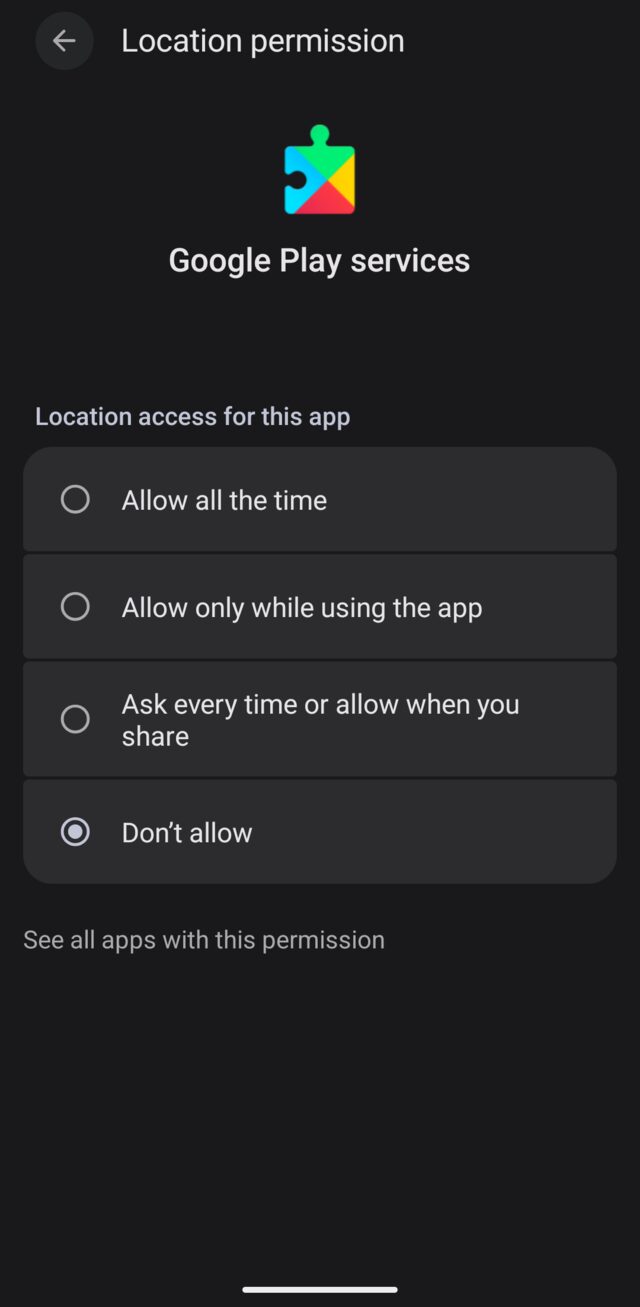
One warning. According to the GrapheneOS guide, without Location in Play services, location sharing in Maps stops working (it needs “Allow all the time” and Physical activity). Google’s own network location stops working too, which the guide does not recommend anyway. For me that is a feature, not a bug. If you use location sharing in Maps, decide what matters more to you.
The second thing is battery. Rerouting uses more power until you switch on GrapheneOS network location. It helps determine your position from Wi-Fi networks and cell towers, so GPS does not have to do all the work. You will find it in Settings > Location > Location services > Network location.
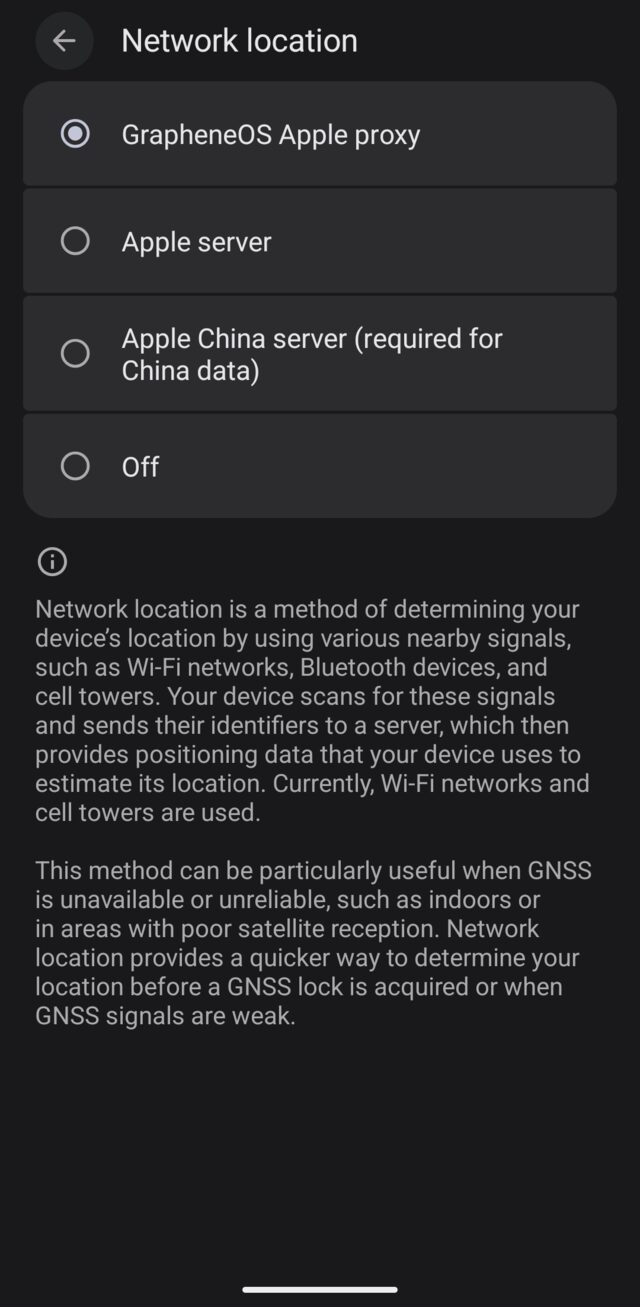
The choices are the GrapheneOS Apple proxy, the Apple server directly, the Apple server for China, and off. Yes, GrapheneOS uses Apple here, not Google. GrapheneOS does not say directly why not Google, so I do not know exactly. Three things can be read from what they have written. They say Apple’s service is offered openly, without sign-in. Its interface returns the locations of specific Wi-Fi networks, so your own position is computed by the device, which is a difference from Google’s service. And they want to build their own network database from Apple’s data and plan to offer it for download and for use offline (GrapheneOS, Privacy Guides).
The request contains the identifiers (BSSIDs) of the 15 strongest nearby Wi-Fi networks, and the system also asks about up to 100 networks in the area to fill a cache. According to GrapheneOS it does not send signal strengths or your location (discussion). The answer is the locations of those networks, not your location: the device works that out itself. The data is kept in memory only (at most 10,000 networks, 15 minutes after last use), so no location history is stored. The service needs no sign-in, so your account is not used for it.
The GrapheneOS proxy sits between you and Apple, so Apple sees the proxy’s IP address, not yours. You pay for that with trust in GrapheneOS. They describe it as a choice themselves (discussion): the proxy makes sense if you trust them more than the service itself, but if you want as few parties as possible in the chain, connect directly.
It is not free of cost, but it helps to know what exactly is revealed. Apple knows which Wi-Fi networks are at which address even without you: it is enough that somebody with an iPhone walked past. The request carries no user identifier, and through the proxy Apple does not even see your IP address, so the most it learns is that somebody at this place sent a request. With a direct connection it would also see the IP address. And if it bothers you that somebody knows what Wi-Fi you have at home, so does a neighbour on the other side of the wall or anyone walking past the house. If it still bothers you, you can switch network location off and rely on GPS, which is slower and weaker indoors. It is a trade-off between accuracy and who knows where you are. For me the best working choice is the proxy.
What can break
What may stop working:
- Location sharing in Maps. As described above.
- Automatic filling of SMS codes. Apps that take the code from an SMS through Play services (some banks) may no longer manage it.
- Phone number verification through Google. It may stop working if you take away the Phone permission.
Everything can be reverted by the same path: Settings > Apps > Sandboxed Google Play > Play services app info > Permissions.
What I tried, and what I would not do
The teardown has a section on going further than settings. I looked at two ideas, both only in theory.
- Modifying and repackaging the APK. Not recommended. I include it only as a theoretical exercise to show whether it makes sense and what it could bring. It is a much bigger pain than it looks: a shared signing identity across Play services and the Play Store, certificate pins in Google’s code, every release renaming the code, and a likely loss of the integrity verdicts that pass today.
- Modifying GrapheneOS itself. Also not recommended, and also just a thought experiment. You would need your own verified-boot key, you would give up official updates, and you would carry the patches through every release.
I mention these so that you do not have to wonder whether there is a clever trick I missed. It is a theoretical consideration, not practical advice. The practical advice is in the sections above.
So, install them?
I will not write the answer for you. For me it is a question of what I protect and how much I am willing to pay. If you need push, maps or Android Auto, install Play services where you need them and take away everything they do not need. Location can safely go through the operating system. If you need none of these things, you do not have to have them at all.
The full teardown in PDF
For those who want to look under the hood, here is the full Play services teardown: 35 pages on what is in the app, what Google sends to it later, what comes out of it, what you can do about it and how to check.
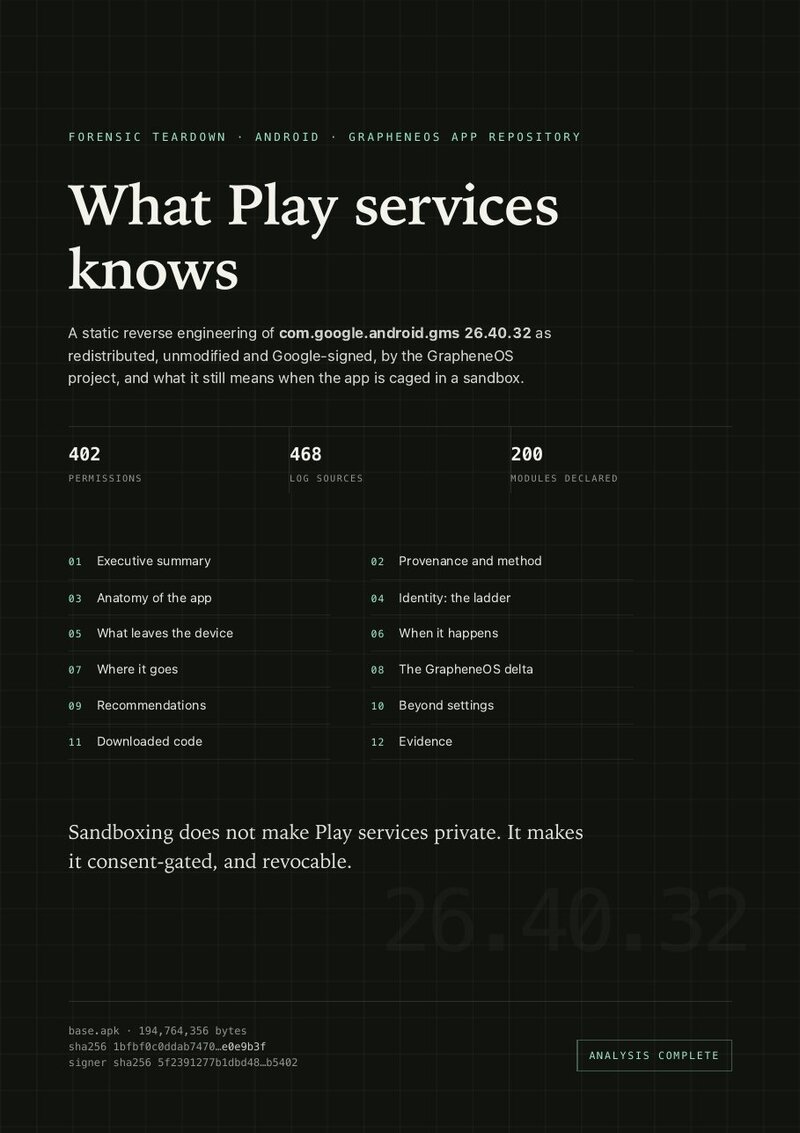
Download the Play services teardown (PDF, 35 pages)
And Android Auto
I took Android Auto apart the same way, the app GrapheneOS offers together with Play services. What I found: it can see the list of every installed app, and its network permission cannot be taken away, because the system keeps it on since the app needs it to work. The car’s Wi-Fi password is stored in its own database, which is unavoidable for a wireless connection, and with the GrapheneOS sandbox I would not worry about it. What you can do about it is in the PDF.
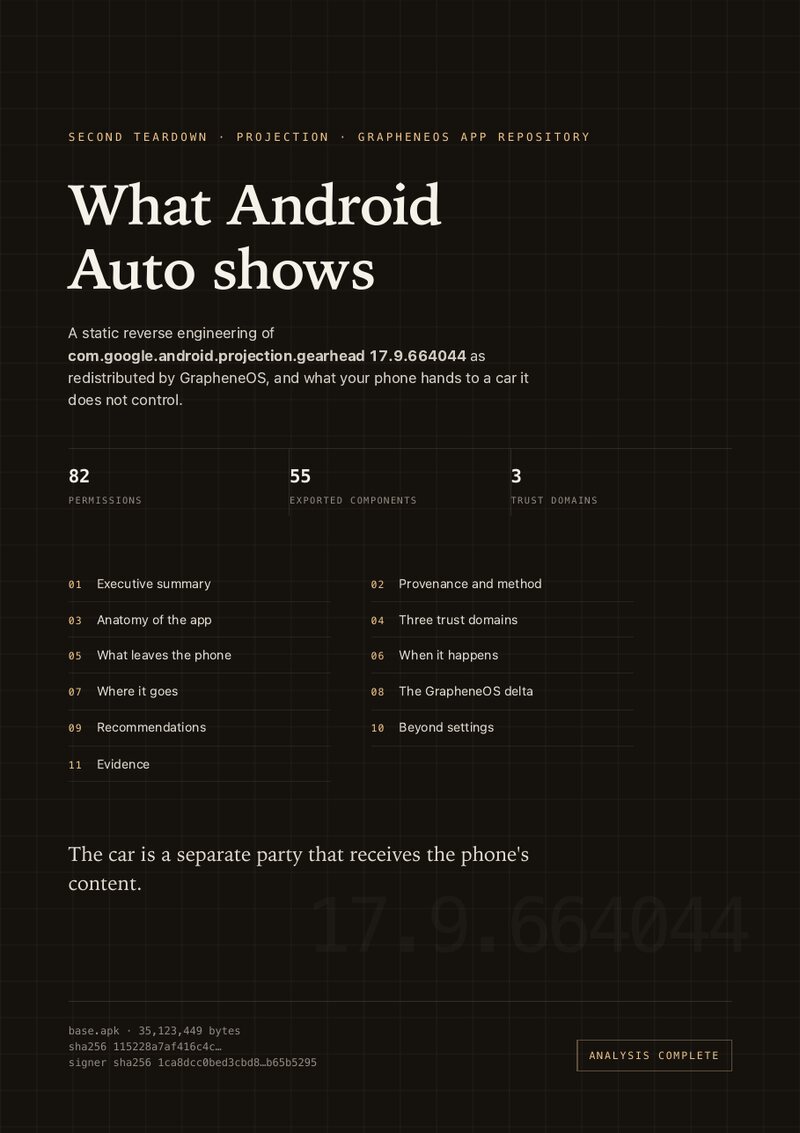
Download the Android Auto teardown (PDF, 21 pages)
Conclusion
Play services give you real functions and you pay for them with data about your device. GrapheneOS puts them in a sandbox, so the price is lower than elsewhere, and you can lower it further: restrict permissions, delete the advertising ID and reroute location to the system.
I keep Play services in my main profile, without location, phone and SMS and with the advertising ID deleted, and in my private profile I keep the things Google should not see, without Play services. You may decide differently. Start with what you protect and what it costs you, and set things up from there.
Support
If the teardown helped you and you want to support it, you can send any amount. Pick whatever suits you.
Lightning (BOLT 12)
Monero

89jGcmA65CReki73oLFvxHUzyR45wMqTN8G93ZYRizWVF2XUQgYKbPLGQYgxj2YjX4fxAUPQ7tLr4ATP7fpR4dSeHH3r9iH
Zcash (unified address)

u1defv75w2x9p6u82qu8je0rrz5g98gnhvs0ervckctfrjvsscvx00e4qgfk63vm0uar587exxhtp3ps7gwd54anwm32a3sg2432htr53nv22d23agngdpdjkdt75lzd8pp0e3f6s2c6n52nk9ecmnjwvdxggflcl7ndsh5uq3wqptk60z
Other ways to support are on juraj.bednar.io/en/support-me.